Great for cookbooks
"I bought All My Books and so did a friend of mine. We are both in love with it. We are cookbook collectors and keep many "books" in our computers using Mastercook recipe software. We point All My Books at our various files, it then goes and looks online for a match...we add info if that's called for right there on the info grabbed window...and store...and the beauty of that is: the program allows us to also store a link back to the "book" and set it to open that book when we click on the little book icon that the program has."
b adams
Book Collector Alternative

Looking for a Book Collector alternative? Collectorz (now CLZ) shifted focus to their browser-based CLZ Books Web product. The classic Windows desktop edition is no longer sold to new customers, no longer gets feature updates, and new buyers are steered into a recurring subscription. That leaves many long-time users — especially people with large ebook libraries on hard drives — searching for desktop book collector software they can still own and run offline.
All My Books is a native Windows catalog for printed books, ebooks and audiobooks: ISBN / title lookup, cover art, loan tracking, links to files on any drive, and both subscription and perpetual license options. You can import an existing Book Collector database in a few clicks — Book Collector does not need to be installed.
Book Collector vs All My Books at a glance
| Feature | Book Collector (CLZ) | All My Books |
|---|---|---|
| Desktop app for Windows | Legacy only — frozen, not sold to new users | Native Windows application, actively developed |
| Perpetual (one-time) license | New sales push web subscription | Perpetual license available |
| Ebook / audiobook files on disk | Web catalog is a poor fit for local file libraries | Scan folders, link EPUB/PDF/audiobook files |
| Import existing Book Collector data | Keep using desktop while it still runs | Database → Import collection from → Book Collector |
| ISBN & online book lookup | CLZ Core (tied to their cloud/subscription world) | Multiple online sources, cover art |
| Printed + digital in one database | Yes (desktop); web differs by plan/features | Paper, ebook & audiobook in one catalog |
| Loan / borrowed book tracking | Yes | Built-in loan manager |
| Virtual bookshelf view | Limited | Yes |
| Works without always-on cloud | Web edition needs the browser service | Local database on your PC |
| Discount for switchers | — | 25% off for migrants |
Why people leave Book Collector for a desktop alternative
CLZ is clear that new development goes into the web product. Existing desktop licenses can keep working for a while, but there are no new features, the app is hidden from the public site, and the recommended path is a paid web subscription. That is a hard sell if you already paid for Book Collector Pro years ago — or if your real workflow is “folders of EPUB/PDF on a USB drive,” which a browser catalog was never designed for.
All My Books stays a Windows program with a local database. You choose annual subscription or a one-time perpetual license, add books by ISBN or barcode, and keep ebook files attached to their cards so you can open them from the catalog.
How to import Book Collector into All My Books
Option A — direct import (recommended if you still have the Book Collector database file):
- Install and start All My Books.
- Open Database → Import collection from → Book Collector... and select the database file. Book Collector does not need to be installed.
- Wait until the conversion finishes, then spot-check covers and custom fields.
Option B — Excel / CSV (if you no longer have the database file or direct import fails):
- Export your collection from Book Collector to Excel or CSV.
- In All My Books use Tools → Import from → Import from MS Excel... (or plain text / CSV).
- Map title, author and ISBN at minimum; then refresh details online for missing covers.
Large or messy export? Contact support — we help Book Collector migrants regularly.
The Book Collector .bkc file has no public specification; we reverse-engineered the format of the last desktop version (23.x) and published it, with an open-source Python script that pulls titles, authors, ISBNs, descriptions and cover files out to CSV/JSON, in our media-catalog-formats repository on GitHub.
Book Collector migrants special offer
Already paid for Book Collector? You do not need to buy All My Books at full price. Request a discount on our special offer page for users switching from another book organizer (25% off).
Also used Collectorz for movies?
The same company pushed Movie Collector toward a web-only subscription model. If you catalog films as well, see our separate guide: Movie Collector vs All My Movies.
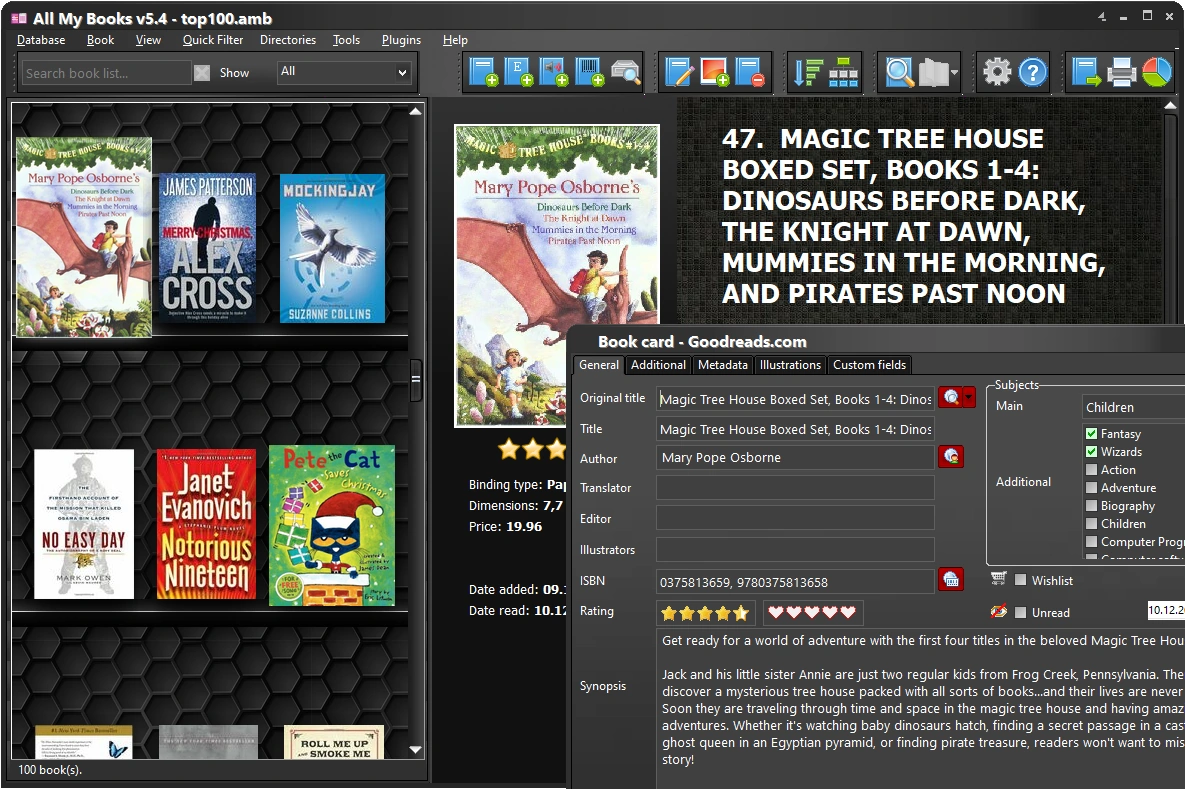
All My Books — screenshot:
What our customers say
Related guides
- BookCAT alternative
- Readerware alternative
- Alfa eBooks Manager alternative
- Booknizer alternative
- Movie Collector alternative
- How to catalog books
- Cataloging software hub
License Benefits:
- No 100-book limit
- Drive scan, Excel/CSV import and new databases after the first 30 days
- No reminder window, no trial banner
- Free updates and technical support
- The license key works instantly, no reinstall