Wonderful program
"Out of everything that I dreamed my book database should be able to do, there is only one thing that All My Books doesn't do, but it does do so much more than I ever imagined that I don't care!You have made it so incredibly easy to do this, and it is much less time consuming than I ever thought it would be, which is a tremendous help. The instructions you give about how to use All My Books in the Help section is very clear and made it very easy to get started. Your user interface is extremely logical and intuitive to use, which too many programs don't manage to do very well. Thank you so much for creating this incredible, wonderful program!"
Joan Dulberg
Ebook Manager Software

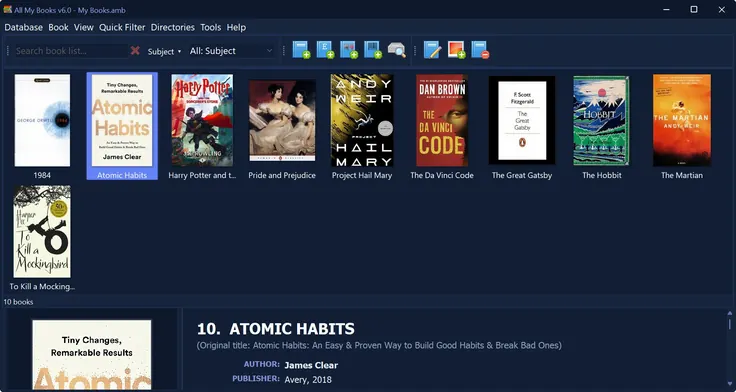
An ebook manager should do three things well: find every file you already have, put a real title and cover on it, and let you open the book in the reader you already use. All My Books is that manager for Windows — EPUB, PDF, MOBI, Kindle AZW, DjVu, FB2 and the rest in one catalog.
It is not a second Calibre library. Files stay in your folders. For the click-by-click scan, see how to organize ebooks. For the searchable card file (shelf, print, paper + ebooks), see ebook catalog software.
What this ebook manager does
- Scan folders — Book → Scan for books on disk/device… reads titles and covers from the files. No copy, no rename.
- Fill missing metadata — lookup from Goodreads, Google Books and other sources: cover, description, series.
- Search and filter — author, genre, series, custom fields; virtual bookshelf if you prefer covers.
- Open in your reader — one click uses the Windows file association (Sumatra, Kindle app, Calibre Viewer…).
- Copy to a device — USB transfer to an e-reader or phone when you want the file on the go.
- Same catalog as paper books — ISBN, loans, reading log, print lists and spine labels.
Ebook manager vs folder chaos vs Calibre
| Folders only | Calibre | All My Books | |
|---|---|---|---|
| Job | Store files | Convert / send to Kindle | Home library catalog + ebook manager |
| Moves or renames files | You do it by hand | Yes — its own library folder | No |
| Printed books, ISBN, loans | No | Not the focus | Built in |
Keep Calibre for conversion. Import the existing library with
Calibre metadata.db
instead of scanning twice.
Formats
PDF, DjVu, FB2, FB2.ZIP, EPUB, MOBI, PRC, PDB, LIT, LRF, RB, AZW, AZW2. Audiobooks can sit in the same database if you want one list for the whole collection.

Print, export, share
Print book cards, cover albums or spine labels from ready-made layouts. Export the catalog to HTML, Excel or PDF. Share one database on the home network if more than one PC should see the same collection.
FAQ
Is this an ebook organizer or an ebook manager?
Same product. People search both phrases. All My Books is the Windows catalog: scan, metadata, search, open in your reader.
Will it replace Calibre?
Not for format conversion. Use All My Books as the catalog you browse every day; keep Calibre when you need to convert or send a file to a Kindle.
Does it work only with EPUB?
No. PDF and DjVu are first-class, along with MOBI, AZW and FB2.
Is there a free trial?
Yes. The first 30 days are unrestricted. After that the program stays free for up to 100 books.
Try the ebook manager
Download All My Books, scan one folder, look up a few covers, and search. If that is faster than Explorer, you have a manager instead of a pile of files.
What our customers say
Looking for ebook manager software? Scan folders, fetch metadata, keep EPUB/PDF/MOBI in one catalog.
Supported file formats:
E-books: PDF, EPUB, MOBI, AZW, AZW3, PRC, PDB, FB2, FB2.ZIP, FB3, DOC, DOCX, DjVu, LIT, LRF, LRX, RB, CHM, TXT
Audiobooks: MP3, M4B, M4A, AAC, OGG, OPUS, FLAC, WMA, AA, AAX
Audiobooks: MP3, M4B, M4A, AAC, OGG, OPUS, FLAC, WMA, AA, AAX
How-to:
organize ebooks step by step
License Benefits:
- No 100-book limit
- Drive scan, Excel/CSV import and new databases after the first 30 days
- No reminder window, no trial banner
- Free updates and technical support
- The license key works instantly, no reinstall